


ID.me: Wallet & Rewards
4.146.00 Reviews
App Specs
- Version
- 1.16.0
- Updated On
- License
- Free
- Downloads
- 50,000+
- Developer
- ID.me
- Categories
- Productivity
- Platform
- Android
Screenshots
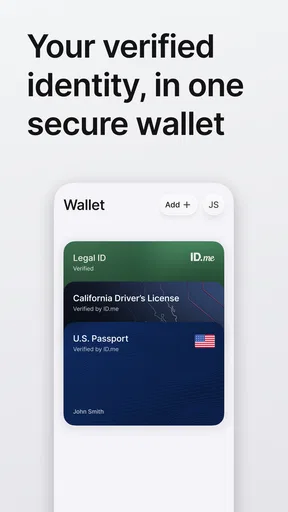
 Analysis by AppCompare
I look at ID.me: Wallet & Rewards as a practical identity and savings companion rather than a general-purpose productivity tool. Its purpose is straightforward: help me prove who I am, keep identity documents in one place, and reach savings connected to eligibility. That combination makes it more specialized than a normal wallet app, but also more useful in situations where repeatedly confirming identity becomes a chore.
The app comes from ID.me and is free to use. It sits in the productivity category, carries an Everyone age rating, and has reached over 50 thousand installs. The current release is version 1.16.0, and it runs on Android 8.0 or later. Those details matter because this is an app I would consider for a practical task, not something I would install casually and forget about.
After spending time with it, my main conclusion is that the right question is not whether it replaces every wallet, rewards, or document app. It does not. The better question is whether I want one focused place for identity verification and savings I may already qualify for. If the answer is yes, its focused design is appealing. If I only want to store ordinary loyalty cards or manage passwords, another category of app is likely a better match.
What I would judge before installing it
Before installing, I’d decide whether I want a dedicated place to begin identity-related tasks or whether my current system already handles them well. I’d also think through who can access my phone and how I would manage without it in a pinch, since convenience is most useful when it doesn’t become a single point of dependence. That judgment leads naturally to the question of what the app’s focused approach is actually best at.
The real decision is about repeated identity tasks
I would choose this app based on how often I deal with services that ask me to prove eligibility. Someone who occasionally needs identity verification may find it useful as a prepared starting point, while someone who never uses identity-based services may not get much value from keeping it installed. The rewards angle adds a reason to return, but the identity function is what gives the app its distinctive role.
There is also a difference between storing an ID and simply taking a photo of one. A photo can be useful as a visual reference, but it does not necessarily help with a verification process. ID.me: Wallet & Rewards is aimed at the more structured side of that problem: keeping identity information available for situations where proving who I am is part of the process. That makes convenience more important than flashy presentation.
I would also consider trust and attention. An identity-focused app deserves a more careful setup than a basic coupon folder. I would use a strong device lock, keep the phone updated, and avoid treating the app as a replacement for every original document. The convenience is valuable, but it should support sensible personal security habits rather than encourage careless storage.
Worth Reading Before You Choose

EA SPORTS FC Mobile 26 Is a Bigger Football Game, but It Takes Time

Flipboard Shows What News Apps Must Do Beyond the Feed

Switching to Android Auto Means Rethinking Your Driving Routine

Google Calendar Makes a Crowded Week Easier to Manage

Ludo King Makes the Most of the Minutes Between Plans

Baby Panda World Brings Quick Play to Modern Phones, but Its Game Library Feels Busy
Who benefits most from the focused approach
The strongest audience is someone who regularly moves between services, programs, or offers where eligibility needs to be established. That might include a person who wants a central place to manage identity details while checking whether available savings apply to them. The app is also appealing to people who dislike searching through email, screenshots, and separate websites whenever they need to find a benefit.
I can imagine using it before a busy travel day or a major purchase. Instead of trying to remember which service handled a previous verification, I would first check the wallet and rewards area, then follow the relevant process from there. The benefit is not that every task becomes automatic; the benefit is that the starting point becomes easier to find.
It may also suit a household member who is comfortable with smartphones but does not want to maintain several separate accounts for identity-related tasks. That said, I would not assume it is ideal for sharing between people. Identity information is personal, so each user should manage their own account and device rather than treating the app like a family document drawer.
What I would check during setup
I would begin by confirming that my phone meets the minimum Android requirement and that I have enough time to complete identity-related steps carefully. This is not the kind of application I would install moments before an appointment and expect to understand instantly. A calm setup gives me a chance to review what I am adding, recognize the rewards area, and learn where important information is located.
One useful habit is to organize my expectations before opening the app. I would make a short list of the identity services and savings programs I actually use, then see whether the app helps with those needs. This prevents the common mistake of collecting every possible offer without knowing which ones are relevant. The app is more useful as a filter for real-life tasks than as a place to browse endlessly.
I would also keep original documents accessible elsewhere. A digital wallet can reduce friction, but it should not become the only place I know where my information exists. That is an important trade-off: the more convenient a central wallet becomes, the more important it is to maintain a backup plan for situations involving a dead battery, a lost phone, or a service that still asks for the original document.
Where it is most convincing
The strongest part of the experience is the way identity and savings sit beside each other. In many everyday routines, I first prove eligibility and then look for a benefit. Keeping those ideas in one app makes more sense than forcing me to jump between a document folder, a browser, and a collection of reward programs.
I also like the practical focus. The app is not trying to be my entire digital life. It has a clear job, and that makes it easier to decide whether it belongs on my phone. When an app has a narrow purpose that matches a recurring problem, I am more likely to remember it at the moment I need it.
The free price lowers the barrier to trying it. I can test whether the identity wallet and savings discovery fit my routine without committing to a subscription. That does not remove the need to think about privacy or usefulness, but it does make the decision less financially risky than choosing a paid organizer before knowing whether I will use it.
A realistic everyday scenario
Imagine I am preparing for an appointment that may require proof of identity and I also want to check whether a related saving applies to me. In the old routine, I might search my messages for previous instructions, open a browser, look through photos of documents, and then try to remember where a benefit was mentioned. With this app, I would start in one place, check my stored identity information, and review the savings section before leaving home.
The important improvement is not necessarily fewer steps in every case. It is reduced uncertainty. I know where to begin, and I am less likely to discover at the last minute that I left an important detail in another application. For me, that kind of preparation is where the app earns its place.
There is a second scenario that shows its limits. If I am simply buying coffee and want to scan a standard loyalty card, an ordinary wallet app may be faster and more suitable. ID.me: Wallet & Rewards is not compelling because it stores everything; it is compelling when identity and eligibility are part of the same errand.
Three less obvious ways I would use it
- Use it as a pre-appointment checklist: I would open the app the evening before an identity-sensitive appointment, confirm that the relevant information is available, and check whether a connected saving is worth investigating. This turns the wallet into preparation rather than an emergency tool.
- Separate discovery from decision-making: I would treat the rewards area as a place to find possibilities, not as proof that every offer suits me. Before acting, I would read the conditions shown in the relevant service and decide whether the saving is genuinely useful.
- Keep a fallback routine: I would know where my original documents and account recovery details are stored outside the app. This preserves the convenience of a digital wallet without making a single phone the only route to my identity information.
These habits make a difference because the app’s value is tied to timing. A wallet that is opened only after a problem appears may feel incomplete, while one checked in advance can prevent avoidable delays. The best use is therefore slightly proactive: prepare information before the moment when someone asks for it.
Where the usual alternatives may fit better
Compared with a standard password manager, this app serves a different need. A password manager is designed around login credentials and secure access to online accounts. I would choose that category when my main problem is remembering passwords, not proving identity or finding eligibility-based savings. Using the wrong tool for the job would leave me with a neat collection of documents but no solution for account security.
A regular mobile wallet is also a different alternative. It is usually the better choice for payment cards, tickets, transit passes, or everyday loyalty cards. If my routine is centered on tapping to pay and presenting barcodes, I would not install a specialized identity wallet solely for those tasks. The two categories can complement each other, but neither one should be judged as a complete replacement for the other.
Cloud storage may be preferable for people who need a broad archive of scans, receipts, forms, and household records. It offers a more general filing mindset, whereas ID.me: Wallet & Rewards is more focused on identity and savings. I would use cloud storage for a large personal archive and this app for the identity-related items I need to reach more purposefully.
Finally, some users may prefer handling every verification directly through each organization’s own website or application. That approach can feel more controlled because the process stays within the service being used. The trade-off is fragmentation. I would accept that extra switching if I rarely verify my identity, but I would prefer a central starting point if those tasks appear repeatedly.
Friction I would not ignore
The app’s specialization can also make it feel unnecessary. If I do not qualify for or use identity-linked savings, the rewards side may not change my routine. Likewise, someone who already has a reliable document system may see little reason to move information into another app. Free installation is not the same as automatic value.
Identity workflows can also demand patience. Whenever personal information is involved, I expect to slow down, check entries, and follow instructions carefully. That is not a flaw unique to this product, but it affects the experience: anyone looking for instant access with no verification effort may be disappointed by the nature of the task itself.
Another limitation is concentration. Putting identity information and savings in one place is convenient, but it means I need to be more deliberate about device access and account recovery. I would not install it on a phone that other people freely use, and I would think twice before storing sensitive information on a device I do not control.
The cost of changing from another system
Switching is easiest when I am starting from scattered information rather than a carefully maintained system. If my documents are currently spread across screenshots, email attachments, and notes, the app can provide a clearer home for the identity-related material. The initial effort is mainly deciding what belongs there and what should remain in a separate archive.
The move is less attractive if I already depend on a general wallet, a secure document vault, and a separate rewards routine that work well together. In that situation, adding another app may create one more place to check rather than simplifying anything. I would only switch if the identity and savings connection solves a specific annoyance that my current tools leave unresolved.
I would also avoid transferring information in a rush. A sensible transition means checking each item, removing outdated copies, and keeping a private record of where important originals are located. The goal is not to duplicate every document blindly. It is to create a smaller, more useful collection that supports the situations I actually encounter.
How the current release fits the decision
The current version is 1.16.0, and the app was released on March 3, 2026. I mention that because version context helps me decide how much attention to give the setup experience. I would still judge it by whether the wallet is understandable, whether the savings area is relevant to my needs, and whether I feel comfortable using it for identity-related tasks.
The app has an average rating of 4.0 from around 120 ratings, with around 45 written reviews. I read that as a reasonable sign of interest rather than a guarantee that every workflow will suit me. Ratings can indicate general satisfaction, but my decision depends more on the match between the app’s purpose and my own identity and savings routines.
The Everyone content rating makes it broadly approachable from an age-classification perspective. Even so, the subject matter calls for adult judgment about privacy, device security, and who can access the phone. A general content rating should not be confused with a recommendation to share an account or treat sensitive information casually.
Who should skip it
I would skip this app if my only goal is contactless payment, barcode loyalty cards, or password storage. Those needs belong to other tools, and adding an identity-focused wallet would probably make my phone feel more crowded. I would also skip it if I am unwilling to maintain a secure device or take time to review identity information before relying on it.
People who prefer paper documents for every identity task may not find enough benefit to justify changing their routine. The same is true for users who rarely encounter eligibility-based offers. In both cases, the app’s central advantage would remain mostly unused.
I would be cautious about using it as the sole emergency backup. A phone can be lost, damaged, locked, or out of power. The app can improve access during normal use, but sensible planning still means keeping an independent fallback for important identity situations.
My recommendation after weighing the alternatives
I recommend ID.me: Wallet & Rewards to people who want a focused way to manage identity information while checking savings connected to their eligibility. Its free availability and clear purpose make it easy to try, and the strongest benefit is the reduction in searching when a verification task and a possible reward arrive together.
I would not recommend it as a universal replacement for a payment wallet, password manager, or general cloud archive. Those alternatives remain better when their specialized jobs are the ones causing me trouble. The app makes the most sense as a companion, not as a claim that one tool should hold every digital item I own.
My practical advice is to install it before you need it, set it up patiently, and test whether it fits one real recurring task. Keep your device protected, maintain a separate fallback for original documents, and judge rewards by usefulness rather than by the excitement of finding another offer. The right reason to keep this app is dependable identity convenience, with savings as a helpful bonus.
For that audience, I can see it becoming a quiet but valuable part of a routine: not an app I open for entertainment, but one I appreciate when an otherwise awkward identity check becomes easier to prepare for. If that situation sounds familiar, ID.me: Wallet & Rewards is worth considering.
Pros
- Secure identity verification helps protect access to supported services.
- Stores eligible digital IDs for convenient presentation when needed.
- Rewards section can help users discover available discounts and offers.
- Useful for government
- healthcare
- education
- and other verified accounts.
- Free to download and available on both Android and iOS.
Cons
- Not every organization accepts ID.me credentials or digital IDs.
- Verification may require sensitive personal documents and biometric data.
- Account recovery can be difficult if you lose access to your phone or email.
- Rewards availability and value vary by location and participating merchants.
- Some users may experience delays during identity verification or support requests.
FAQs for ID.me: Wallet & Rewards
What is ID.me: Wallet & Rewards used for?
ID.me: Wallet & Rewards is a digital identity and credential management app designed to help users securely store, access, and share verified information. It can be used when signing in to participating government, healthcare, education, employment, or commercial services. The app also includes a rewards area where eligible members may find discounts and special offers from participating brands.
Is ID.me: Wallet & Rewards safe to use for identity verification?
The app is built around identity verification and uses security measures such as account credentials, encrypted connections, and additional verification options when required. However, users should still protect their password, avoid sharing verification codes, and install the application only from an official app store. Before submitting sensitive documents, review the requested permissions and confirm that you are using the legitimate ID.me service.
What documents or information are required to create an ID.me account?
The information required depends on the service or identity level you are trying to access. You may be asked for personal details such as your legal name, date of birth, address, phone number, or email address. Some verification processes can also request a government-issued identification document, a selfie, or other supporting information. Requirements may vary by organization and location.
Can I use ID.me: Wallet & Rewards to access government or other online services?
Yes, ID.me is accepted by various participating organizations, but it does not provide universal access to every website or agency. When a supported service offers ID.me as a sign-in or verification option, you can use your account to authenticate your identity. Availability, verification requirements, and the information shared can differ depending on the organization you are accessing.
How do the rewards and discounts in ID.me work?
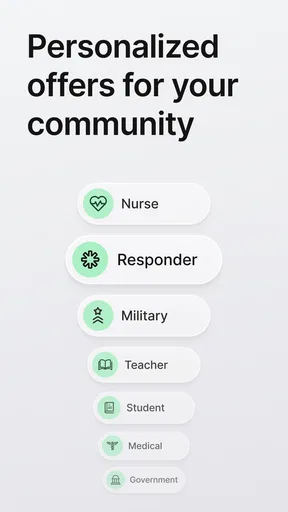
The Rewards section may provide discounts, promotions, or special shopping offers from participating merchants. Eligibility can depend on your verified group, such as military status, student status, first responder status, teacher status, or another qualifying category. Offers can change, expire, or include restrictions, so check the terms before purchasing. ID.me generally redirects you to the merchant to complete the transaction.


